Automatic appointment reminders that cut no-shows
Most no-shows aren't rude, they're forgetful. A reminder at the right time, with the address and a way to change the booking, turns a lot of them into customers who turn up, or at least tell you in time to fill the slot.
Start free All featuresIncluded on every plan, even the free one. Free for 100 new bookings a month.
As many reminders as you need
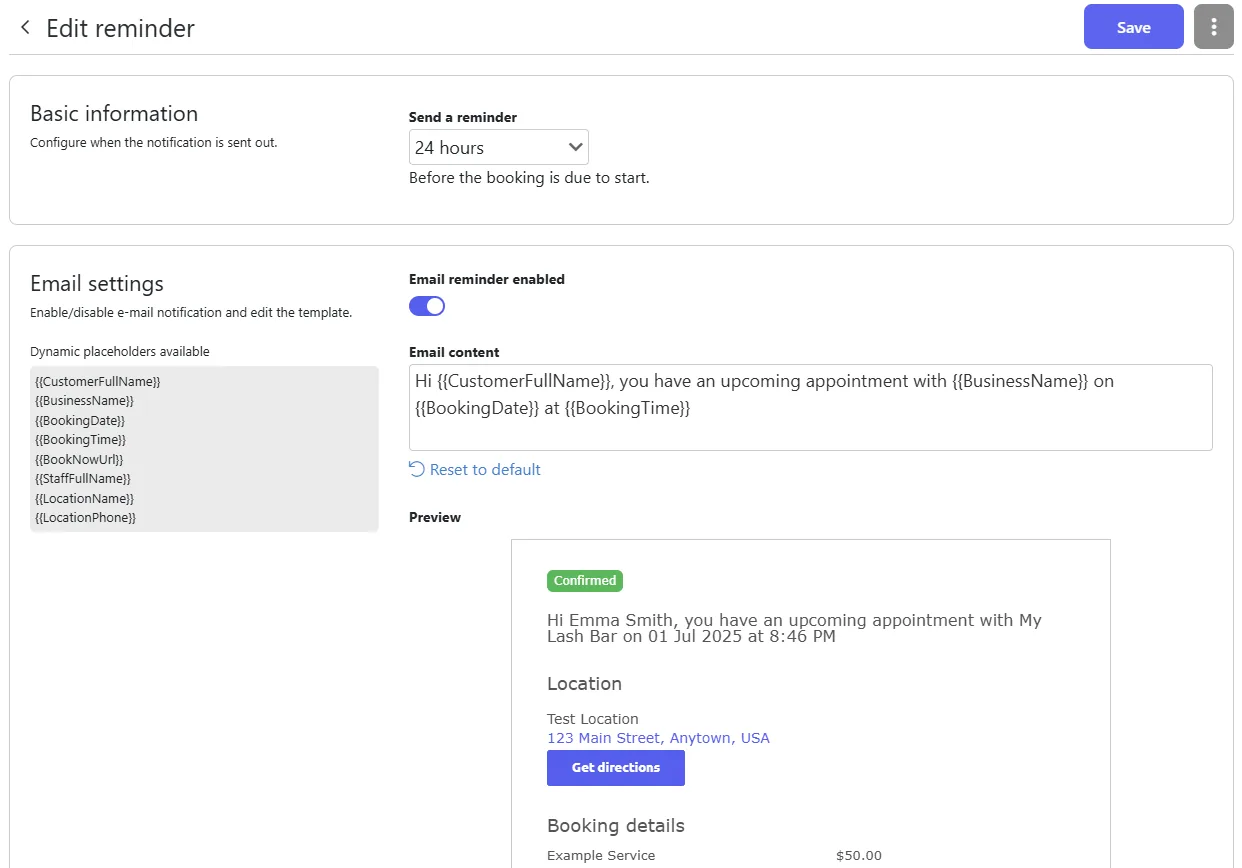
Add one reminder or several, such as two days before and two hours before. Each one goes out automatically for every booking, made online or by your team.
Written the way you talk
Edit the wording of every message and drop in placeholders that are filled in for each booking. A preview shows exactly what the customer will receive.
- The customer's name, the date and time, and who they are seeing
- The location's address, phone number and a directions link
- Your special instructions, such as parking or what to bring
- A Manage booking button so they can change or cancel within your rules
- A Book now button that links back to your booking page
Every other booking email, too
Confirmation, reschedule and cancellation emails go out automatically. Appointment businesses can also send a thank-you after the visit and a message when someone doesn't show. You can check every email on the customer's record, including whether it was delivered and opened.
Set it up in minutes
- Open Customer notifications and choose when your reminder is sent.
- Edit the wording and add placeholders such as the address and Manage booking button.
- Add a second reminder if you want one closer to the time.
- Save. Every booking from then on gets its reminders automatically.
Popular with
Hair salons
Stylist calendars, colour processing time and a full chair.
Barbershops
Quick cuts, busy chairs and a booking page that works mid-fade.
Nail salons
Gel, acrylics and pedicure chairs, booked without the phone.
Chiropractors & osteopaths
Short, frequent adjustments and a diary that stays full.
Driving instructors
Lessons with travel time, packs of lessons and pickup details.
Squash
Short slots, back-to-back games, a tidy diary.
Questions about automatic reminders
Are reminders sent by text message?
Reminders are sent by email. You choose when they go, and you can add more than one.
Do reminders cost extra?
No. Reminders are included on every plan, including the free plan, and don't use up any of your monthly bookings.
Can customers cancel from the reminder?
Yes, if you allow it. Add the Manage booking button, and customers can cancel up to the cut-off you set. Anything they paid online is refunded automatically.
Can I see whether a customer received their reminder?
Yes. The Messages page shows every email sent to a customer and whether it was delivered and opened.
Try it on your own business
Every feature is on every plan. Bookingly is free for 100 new bookings a month, then one flat price for unlimited bookings, however many staff you have.
Sign up for free