
Features for appointments and for venues
Bookingly works for businesses that sell time with a person, like salons and clinics, and for businesses that sell time in a space, like courts, pitches and rooms. You pick the style that fits when you sign up. The two share the same booking page builder, payments, staff logins and locations.
For businesses that sell time with a person
Each service has its own length, price and staff. Customers choose a service, a person and a time.
Booking calendar
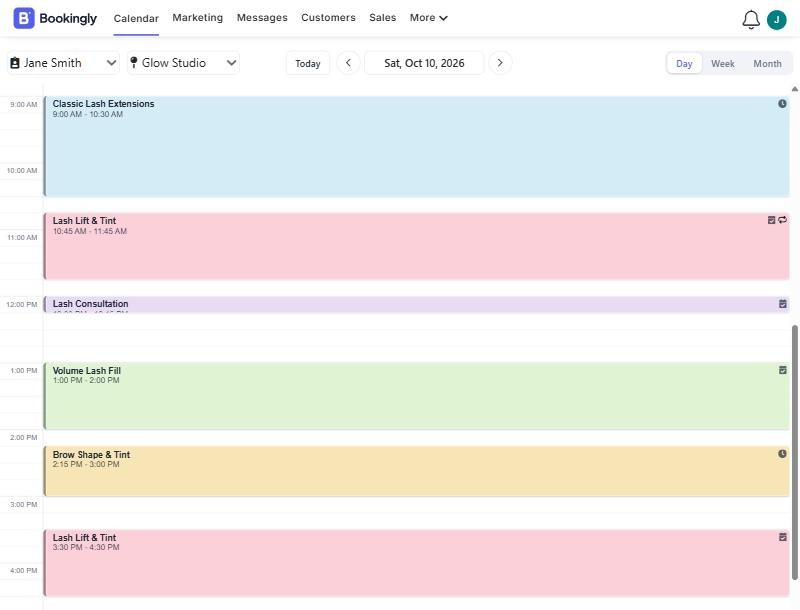
Times only show as available when your staff are free. Add bookings for customers who ring or walk in, and drag a booking to a new time when plans change. The customer gets an email about the move. Block time off in any colour you like so your calendar is easy to read.
Recurring appointments
Some customers come in every week. Book them once and Bookingly fills the calendar: daily, weekly, monthly or yearly, ending after a set number of visits, on a date, or never. When something changes, edit just that visit, or that visit and every one after it.
Custom forms
Collect what you need before the appointment. Build a form with text answers, numbers, dates, dropdowns, multiple choice and tick boxes, then attach it to the services that need it. Add a consent box for terms or a waiver.
Ask follow-up questions only when they matter. If a client ticks "pregnant", show the pregnancy questions. If not, they never see them. Forms can appear on the booking page, or be emailed to the customer as a link. Choose whether they fill it in once or at every appointment.
Cancellations
Let customers cancel their own appointments from the link in their email, up to a cut-off you choose, such as 24 hours before. Bookings paid online through Stripe are refunded to the customer automatically.
Automatic Reminders
Reminders go out before the appointment with the time, place and a link to directions. Edit the wording so they sound like you. Customers who get reminded turn up more often.

Stay organised with notes
Add notes to a customer or to a single booking, so whoever is on shift knows about the allergy, the preferred chair or the gate code.

Product management
Keep track of retail items and treatment supplies in one list. Update quantities and edit details as stock comes and goes.

Sell more at checkout
Add products, extra charges or a discount when you check a customer out. Reward loyal customers, or charge for the extra time when a booking runs long.

Invoices with the right tax
Send an invoice to a customer by email whenever they ask. Bookingly handles GST, VAT and sales tax, so your invoices show the tax line they should.

For businesses that sell time in a space
Courts, pitches, bays and rooms are booked by the hour. Customers see what's free across all of them at once.
A live grid of everything that's free
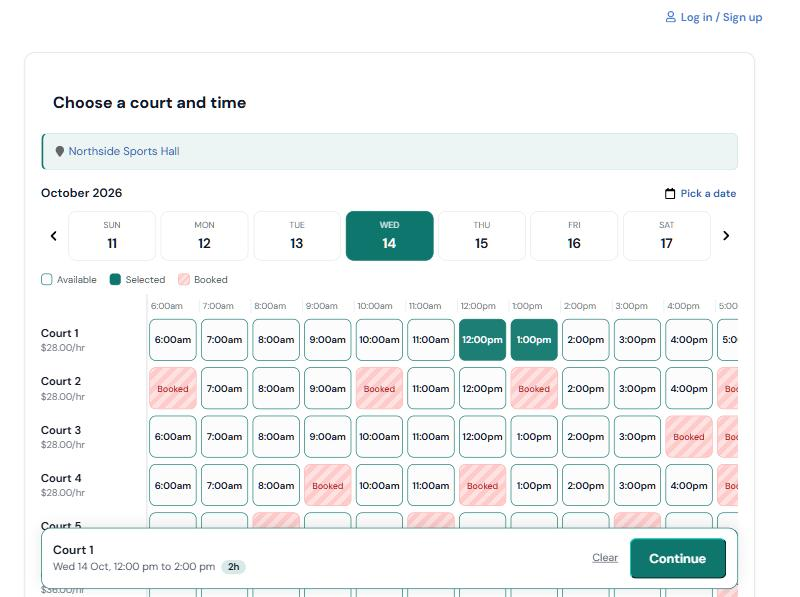
Add each court with its own price and slot length, set your opening hours, and customers pick a time from a live grid on their phone.
- Slots from 15 minutes up to 8 hours, priced per hour
- Customers can book several courts in one go
- A slot is held for a few minutes while someone checks out, so two people can't take it at once
- Block courts for coaching, leagues or repairs, once or on a weekly repeat
- Call them courts, pitches, bays or rooms. Your wording appears everywhere
- A dashboard shows what's in use now and how full each court is
See the whole day at a glance
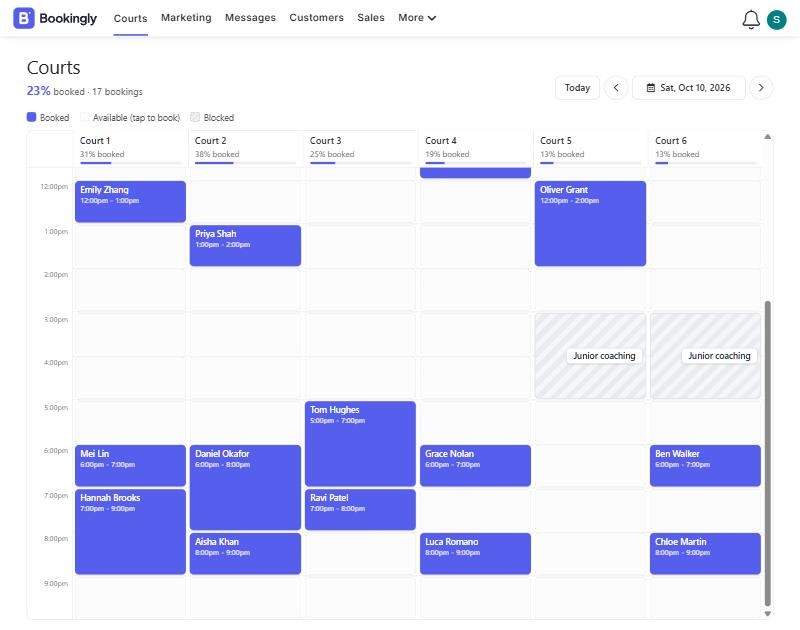
Your calendar shows every court side by side, with how full each one is. Tap an empty slot to book a customer in, drag a booking to move it, and see your coaching and league blocks marked out so nobody books over them.
Block time for coaching, leagues and closures
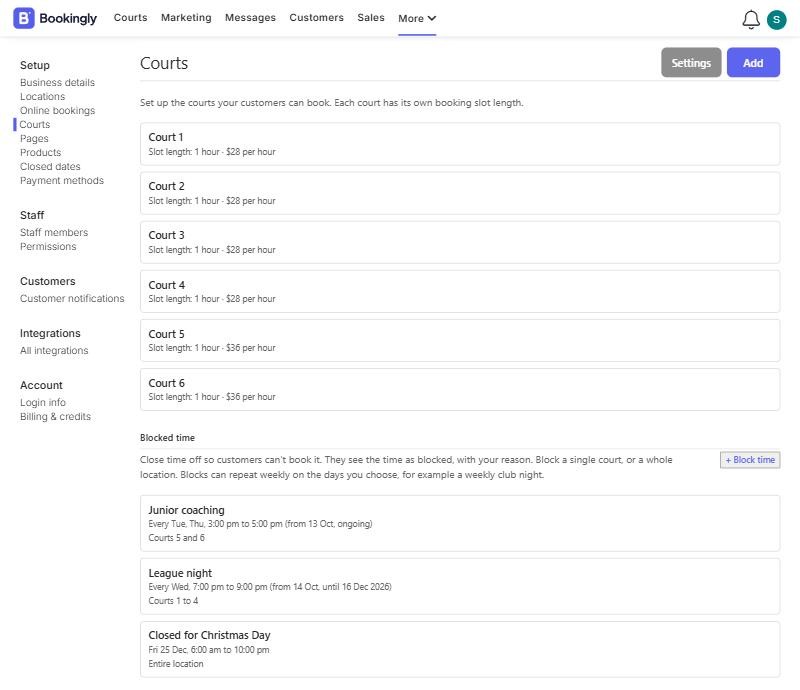
Keep courts free for the things that aren't public bookings. Block the whole venue or just a few courts, once or every week, and add a label so your team and your customers know why.
Payment and confirmations
Players pay for their court when they book, through your own Stripe account, and get a confirmation email straight away. Move a booking with a drag and they are emailed the new time.
Discount codes let you reward members, sponsors or quiet-hour players.
Included whichever style you choose
These work the same for appointments, courts and rooms.
A booking page that looks like yours
The booking page builder lets you choose a layout, fonts, button colours and corner style, add your logo and write your own welcome and confirmation messages. A live preview shows what customers will see on a phone or a desktop before you publish.
Share the link, embed the page in your website or open it as a popup. Add your business icon and it shows in the browser tab too.
Your colours, your brand
Set a theme colour for your booking page so it matches your logo and your website.


Take payments with Stripe
Connect your own Stripe account and customers pay when they book. The money goes to you, not through us. For appointments you can charge the full price, a percentage or a fixed deposit and collect the rest on the day. Courts are charged in full.
Prefer to be paid in person? Leave payments off. It's optional.
Staff Logins
Every plan includes unlimited staff logins. Each person gets their own login, and you decide what they can see and change.
For appointments, customers can pick their preferred staff member when they book, or you can let Bookingly choose for them.

Multiple Locations
Every plan includes unlimited locations. A location is either:
-
Physical
For salons, studios, clinics and venues. Times are in the location's timezone, and reminders can include the address and a directions link. -
Virtual
For video calls and online consults. Times switch to the customer's own timezone, so nobody has to do the maths.

Public holidays
Choose your country and Bookingly lists the public holidays. Tick the ones you're closed, or override any you aren't, and customers can't book those days.
Marketing that fills the diary
Send emails to your customer list, run deals and see how each campaign performed. Review request emails can go out automatically after an appointment. Every email includes an unsubscribe link, and people who opt out stay out.
Messages
See every email Bookingly has sent to a customer, and whether it was delivered and opened. When a customer says they never got it, you can check.

Try it on your own business
Signing up is free. Set up your services or courts, share your link and see how it feels. If something isn't clear, our support chat is a message away.