
Checkout and invoices with the right tax
The booking is only half the job. Check the customer out, add the product they want to take home, take payment however they like, and send an invoice with the tax shown correctly.
Start free All featuresIncluded on every plan, even the free one. Free for 100 new bookings a month.
A fast checkout
- The booking's services are already in the cart
- Add products, extra charges or a one-off price change
- Apply a discount code, a gift card or a session from a package
- Deposits paid online are shown, so you only collect what's owed
- Rebook the customer for next time straight after
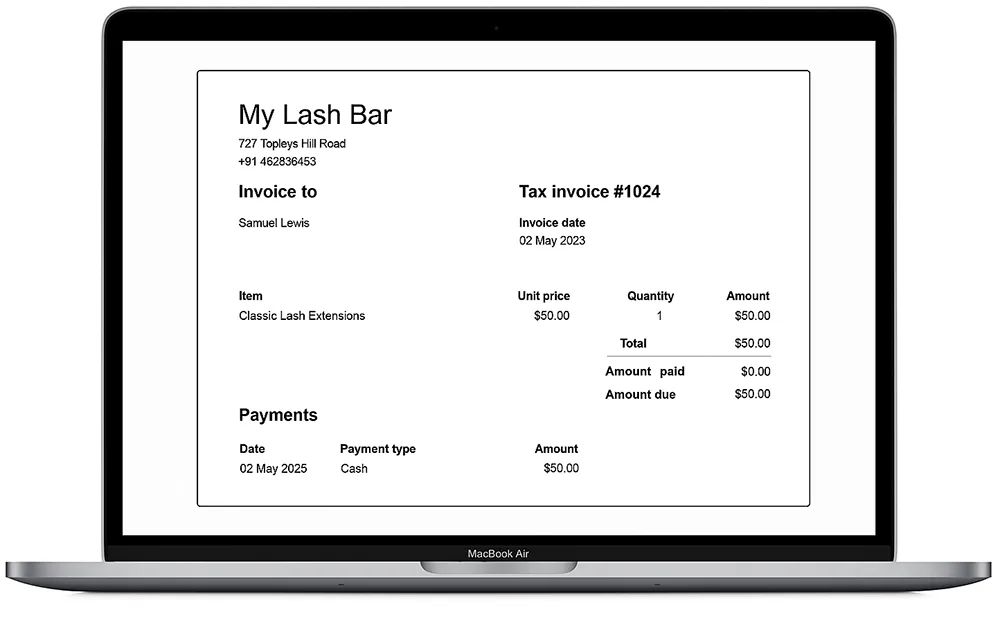
Invoices that are right
Every sale has an invoice with each item's tax shown, your tax registration number if you add one, and the payments taken. Download it as a PDF or email it whenever the customer asks.
Tax time, sorted
The tax report shows the sales and tax you collected for any period, split by tax rate, and downloads as a CSV for your accountant.
Set it up in minutes
- Add your tax rates and choose a default for each location.
- Set up the payment methods you take, such as cash and card.
- Check customers out from their booking.
- Email or download invoices, and run the tax report when you need it.
Questions about checkout & invoices
Does Bookingly handle GST and VAT?
Yes. Add your tax rates, set them on services and products, and invoices show the tax included.
Can I sell products without a booking?
Yes. Create a sale from the Sales page for anyone who just wants to buy.
Does Bookingly have card terminals?
No. Take card payments on your own terminal and record them as card at checkout, or take payment online through Stripe.
Can I export my sales for my accountant?
Yes. The tax report downloads as a CSV file.
Step-by-step guides
Try it on your own business
Every feature is on every plan. Bookingly is free for 100 new bookings a month, then one flat price for unlimited bookings, however many staff you have.
Sign up for free